
Project 2 — Checklist: the spec
Unit 22 · Project 2. A Reminders clone — multiple lists, due dates, priority, flags,
notes, search, and Today/Scheduled/Flagged smart views. Backend Tier 1 (on-device
persistence with SwiftData). AI stage still Tutor — you hand-type, /tutor hints only.
This spec defines the target; the milestones build it.
Project 1 lived entirely in memory. Project 2 makes data outlive the app launch and gives it real structure. You build an app a person could actually run their week on: reminders grouped into lists, each with a due date, a priority, a flag, and notes; smart views that gather what's due today or everything you've flagged; and search across the lot. All of it persists, and it's driven by a SwiftData object graph with a relationship — lists own reminders, and deleting a list takes its reminders with it.
What you build
Checklist — a Reminders app with three surfaces:
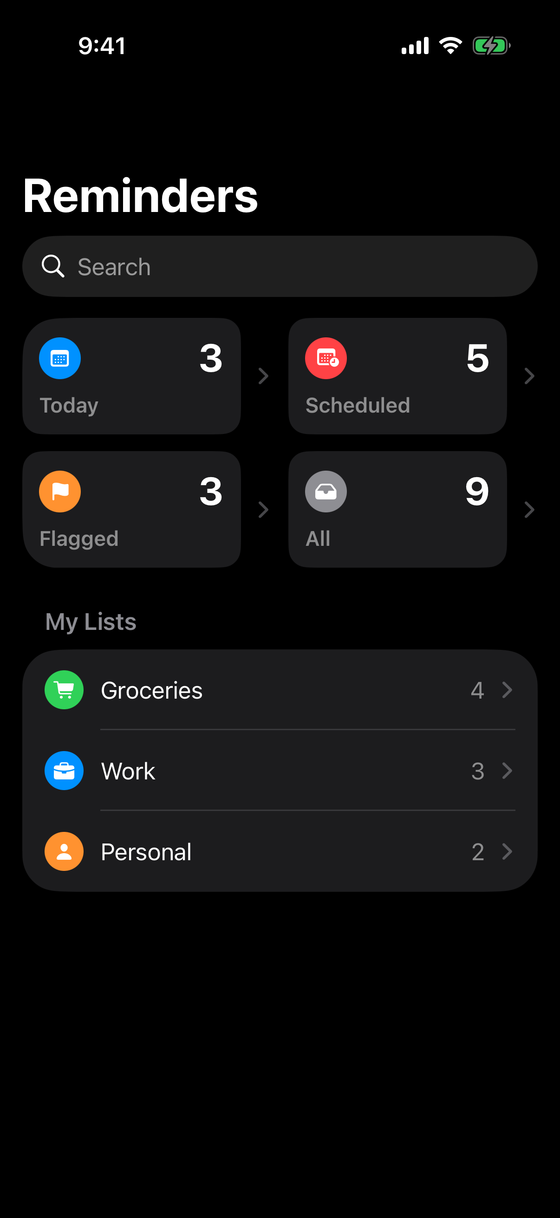
- A home screen: four smart tiles (Today, Scheduled, Flagged, All) with live counts, your lists below with per-list counts, and a search field.
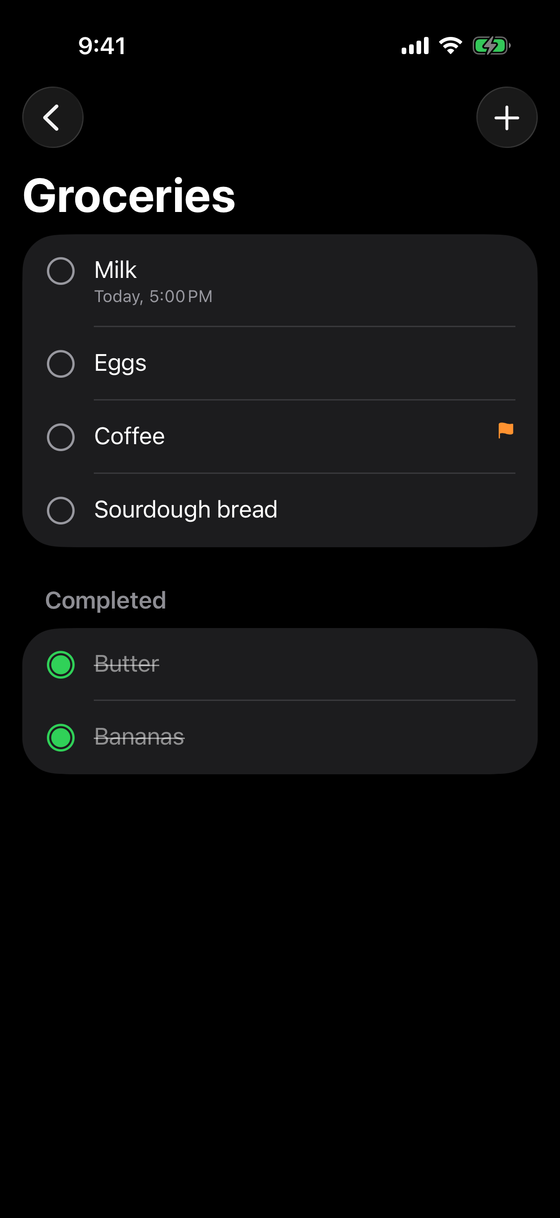
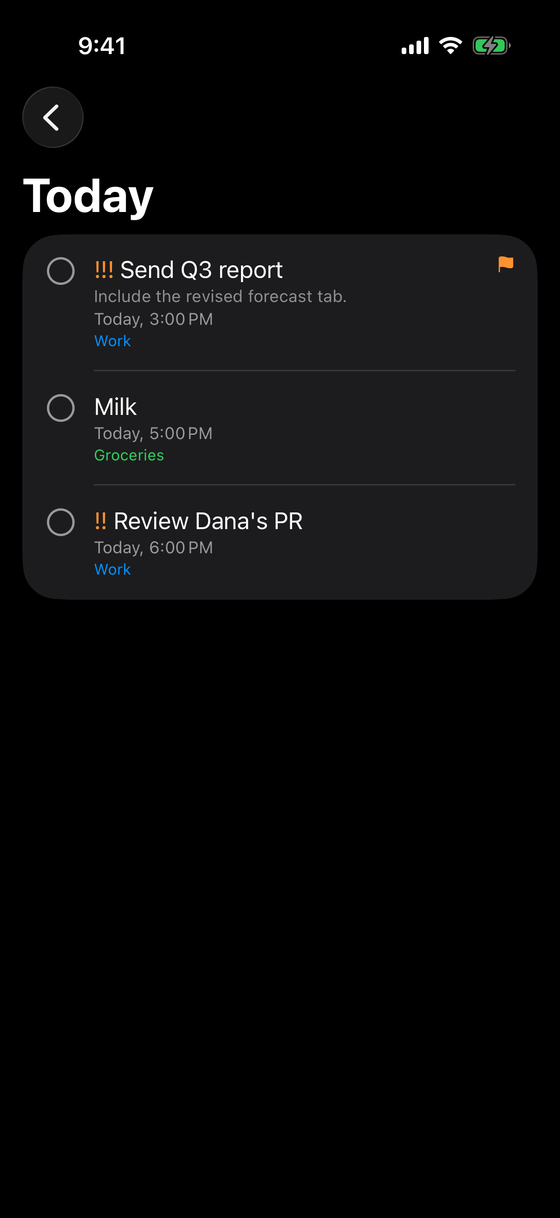
- A list / smart view: the reminders in a list or a smart filter, split into active and completed, each row showing its due date, priority, and flag. Complete on tap, swipe to flag or delete, tap to edit, and add new reminders.
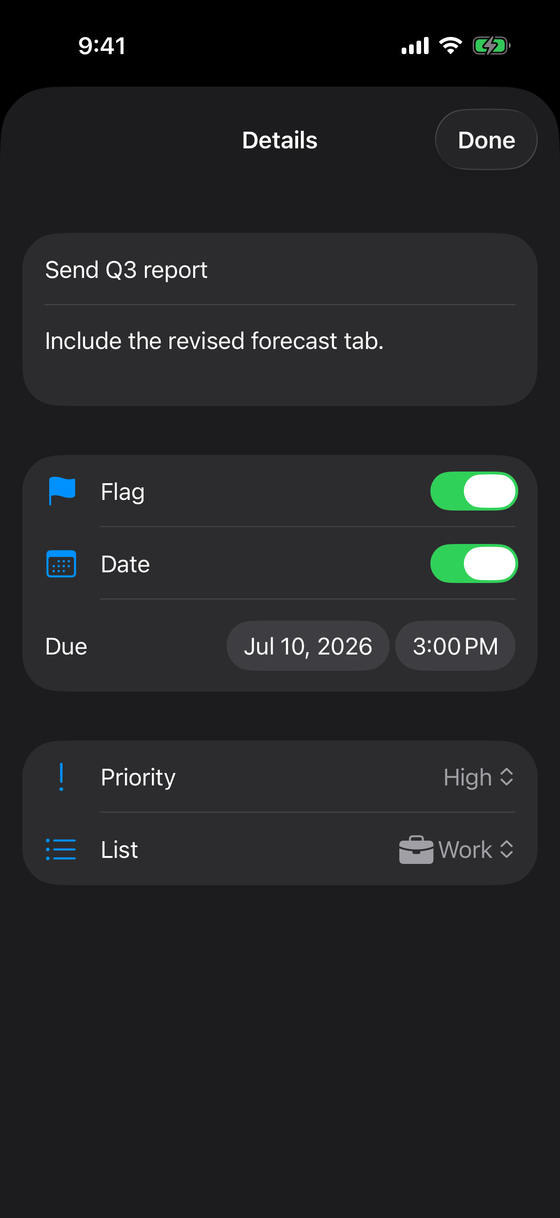
- A reminder detail editor: title, notes, a flag, an optional due date, a priority, and which list it belongs to.
The screens
| Screen | Shows | Key interaction |
|---|---|---|
| Home | smart tiles + your lists with counts, search | tap a tile or list; search |
| List / smart view | reminders with due date, priority, flag; active + completed | complete, swipe to flag/delete, tap to edit, add |
| Reminder detail | title, notes, flag, due date, priority, list | edit any field |
What it looks like finished
Concepts this locks in
- The
@Modelmacro and a SwiftData relationship (ReminderList↔Reminder) with a cascade delete. @Queryto fetch and auto-observe;modelContextto insert and delete.- Deriving smart views (Today, Scheduled, Flagged) by filtering the model over date and boolean fields.
.searchableover the persisted store.List+ForEach, active/completed sections, swipe actions, and a real empty state.@Bindabletwo-way editing of a persisted object, includingDatePickerand a relationshipPicker..modelContainerwiring at the app root with more than one model type.
Backend tier: 1
Tier 1 means local persistence — data stored on device, surviving relaunch, no server. SwiftData is Apple's modern answer (the successor to Core Data), and it's the correct tool: a structured, single-device object graph with a relationship and live-updating queries. You'll feel how little code the relationship and the smart-view filters take compared to what this cost before.
AI stage: Tutor
Same discipline as Project 1: you write every line, /tutor gives concept-level hints, never
pasteable code. SwiftData has sharp edges (where the container is attached, how a relationship
is declared, why a query doesn't update, when a save happens). When you hit one, ask /tutor
a specific question and close the gap yourself. This is the last project before the AI stage
relaxes to Pair — earn the fundamentals now.
Build the model layer first and prove it saves before you make the UI pretty. Get the
ReminderList ↔ Reminder relationship and the container right, then layer on dates,
priority, and the smart views. A Reminders app that persists reliably and looks plain beats
one that looks great and loses your data on the second launch.
In scope
- Multiple lists, each with a name, symbol, and colour, on a SwiftData relationship.
- Reminders with title, notes, done state, an optional due date, a priority, and a flag.
- Smart views — Today, Scheduled, Flagged, All — derived by filtering the store.
- Search across titles and notes.
- Add, complete, edit, delete; active/completed sections; a designed empty state; light and dark both correct and VoiceOver-navigable.
Out of scope
- iCloud sync and sharing (that's higher-tier work; the store is local).
- Actually delivering notifications, location reminders, and recurring/repeat rules.
- Subtasks, tags, and attachments.
- Drag-to-reorder and custom smart-list rules (worthy stretch goals, not requirements).
Definition of done
You create a list, add reminders with due dates, priorities, and flags, complete a couple and watch the counts update, edit one in the detail editor, delete one by swiping, confirm Today and Flagged gather the right reminders across lists, search finds an item by a word in its notes, then force-quit, relaunch, and everything is still there. Then the rubric.
Knowledge check
Q: Why is SwiftData the right persistence tool here rather than writing JSON to a file?
The data is a structured, single-device object graph with a relationship that the UI must
observe live. SwiftData gives you the @Model graph, the relationship with its cascade
delete, automatic change tracking, and @Query that updates the view for free — hand-rolled
JSON gives you none of that and grows brittle the moment you add lists.
Q: What is Tier 1, and what does it deliberately exclude? Tier 1 is on-device persistence: data survives relaunch, no server involved. It excludes sync and networking — those belong to higher tiers (Tier 2+) in later projects — as well as the OS-level delivery of notifications.